The easiest mistake when buying a poe switch is to treat port count as capability. A unit labeled "24-port PoE" may only carry 250 W of total budget; put 24 cameras at 15.4 W on it and the endpoints alone want 369 W — already over. Power budget is really three questions: how big is the pot, how much can each port draw, and how much the cable eats. Look at them separately and you won't crash on day one.
The three generations are not a naming game; they are different power classes. Between the port's labeled output (PSE) and what the device actually receives (PD) sits a slice of cable loss. The table below lists it by the IEEE standard:
Standard | Alias | PSE output | PD received | Pairs | Typical device |
802.3af | PoE / Type 1 | 15.4 W | 12.95 W | 2-pair | Fixed camera, IP phone |
802.3at | PoE+ / Type 2 | 30 W | 25.5 W | 2-pair | PTZ camera, Wi-Fi AP |
802.3bt Type 3 | PoE++ | 60 W | 51 W | 4-pair | High-power camera, LED wall |
802.3bt Type 4 | PoE++ | 90 W | 71 W | 4-pair | Heated pan-tilt, Wi-Fi 6 AP |
Cable loss stays at 10–15%: af loses 2.45 W, at loses 4.5 W, and bt at the 90 W tier loses a full 19 W. The larger the power, the larger the absolute loss — so budget on more than PD alone.
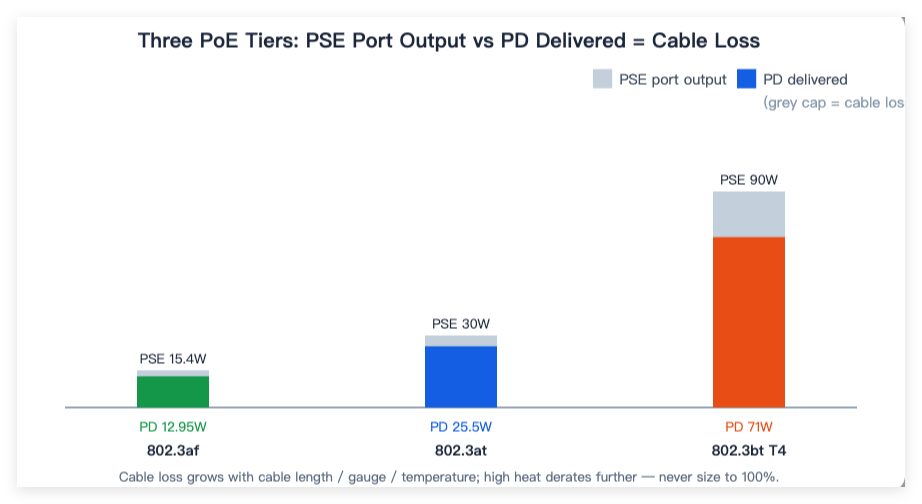
Many integrators pick PoE switches by counting ports: "24 ports covers 24 cameras, right?" Wrong. Port count is the concurrency ceiling; wattage is what actually feeds the gear.
The budget formula is one line: sum of all endpoint PD + cable loss + headroom ≤ the switch's total PoE budget. Ports decide how many things you can plug in, not how much you can power.
The per-port cap is fixed by the standard: af tops at 15.4 W, at at 30 W, bt at 60–90 W. Hang a 25 W PTZ on an 802.3af port and it won't recognize or deliver — it simply refuses to load.
Cable loss grows with three things: longer runs (100 m costs more than 30 m), thinner gauge (Cat5 resists more than Cat6), and higher temperature. On the industrial floor a summer cabinet hits 60°C, and IEEE data shows 802.3at starts derating from 5°C on a 2-pair line, with bt's 4-pair derating even steeper. On hot days don't fill the budget — keep 20% as a temperature margin.
A workshop with 32 cameras: 24 fixed guns on 802.3af (PD 12.95 W), 8 PTZ on 802.3at (PD 25.5 W), plus 4 Wi-Fi APs (estimated at 802.3at 25.5 W).
Endpoint PD total: 24 × 12.95 + 8 × 25.5 + 4 × 25.5 = 310.8 + 204 + 102 = 616.8 W
Add 15% cable loss: 616.8 × 1.15 ≈ 709 W (what the PSE must supply)
Add 20% headroom: 709 × 1.2 ≈ 851 W
Verdict: one box can't feed it. Split across two 400 W-class units, or step up to a 720–900 W high-budget model. Those 8 PTZ + 4 APs must land on at/bt ports; the guns are fine on af. That split is the power budget made real.
Ports enough, watts short: 24 ports stuffed with 24 × 15.4 W endpoints, but only 250 W budget — overload and brownout.
af port for an at device: a PTZ needs 25 W, an af port gives 15.4 W, recognition fails.
Long cable, no derating: a 150 m pull budgeted at 100 m loss — cameras at the end reboot repeatedly.
Non-standard PoE treated as a bargain: a fake "high-power PoE" with no short-circuit protection; when an outdoor pole camera's line ages and shorts, it fries the supply and drags the whole network down. Use standard 802.3af/at/bt in the rack.
1.List each endpoint's PD wattage, multiply by quantity.
2.Multiply by 1.15 for cable loss, then by 1.2 for headroom.
3.Compare against the switch's total PoE budget; add a switch or go bigger if short.
4.Confirm high-power endpoints land on at/bt ports, not af.
5.On the industrial floor, derate another notch for peak temperature — don't fill it.
1、How do I tell af, at, and bt apart?
By wattage and pairs: af 15.4 W / 2-pair, at 30 W / 2-pair, bt 60–90 W / 4-pair. Match the port to whatever your camera or AP is rated for, or above.
2、Why does a 15.4 W port only give the camera 12.95 W?
That 2.45 W burns in the cable — the fixed loss of 802.3af (about 16%). Budget the endpoint at its 12.95 W PD, then add the loss back.
3、Why can't a 24-port PoE switch drive 24 cameras?
Because the limit is total watts, not ports. 24 × 15.4 W = 369 W, but many 24-port models budget only 250 W — full load overloads. Check total PoE budget first.
4、Does longer cable really weaken power?
Yes. Loss rises with length and resistance; 100 m of Cat5e loses about 10–15%. Pull longer or thinner and it loses more, so far-end devices starve and reboot.
Should I leave margin for high temperatures on the industrial floor?
Yes. IEEE data shows at/bt derate in heat; at 60°C a summer cabinet delivers less than the label claims. Don't fill the budget — keep 20% as temperature margin.
PoE power budget comes down to three separate numbers: total pot, per-port cap, and cable loss. Don't let port count fool you. Sum each endpoint's received power, add loss and headroom, then check against total budget and per-port limits — and your surveillance or factory build won't brown out at midnight. Rayin's industrial ethernet switch lineup sizes its total budget and per-port caps to this same logic, so you can just check the table when specifying.