In addition to the software function of the product itself, there are also many independent operation tools, such as Industrial Switch Tools and specific Industrial Switch 8 port solutions, which support link detection, traffic check, message grab and connected diagnosis, which can complete the network problem analysis, quickly locate the field fault, simplify industrial on-site operation.

1. Industrial Switch Tools: network simulation and experimental tools
Why do you need an experimental environment as an engineer?
1.1 Test topology and protocol
the experimental environment verifies VLAN、router、ACL、NAT and other solutions.
1.2 Reduce the risk of change
Test new configurations in a sandbox before moving to the live network.
1.3 Convenient for learning troubleshooting
Intentionally creating faults, makes it easier to understand the behavior of links and protocols.
Common tools are:
eNSP
A network simulation tool platform provided by Huawei, for scalable and graphical operation, mainly simulate enterprise network by router and switch, Perfectly presenting the real scene of the actual equipment, supporting large network simulation, allowing the user to simulate the practice without the actual equipment, and learn the network technology.
GNS3
A advanced network simulation software with graphical interface supports running on operating systems such as Windows, Linux, macOS. This software is mainly used for designing, constructing and testing network topologies in a virtual environment, without the need to rely on real physical hardware.
EVE-NG
The full name of the emulated virtual environment - NextGeneration, this simulator is not only able to simulate the network device, but also to run all virtual machines. In theory, if you can convert the virtual disk format of the virtual machine to qcow2, you can run it on EVE-NG . So EVE-NG can be a virtual environment.
Packet Tracer
It is a network simulation tool launched by Cisco to help network engineers, students and technicians build network topology, configuration protocols and troubleshooting without physical devices.
Containerlab
A container-based network lab tool that allows you to use container simulation for network devices such as machines and switches on a single computer, and easily build complex network topology for experiments and tests.
In conclusion, the experimental tools provide a safe, controllable and repeatable environment that helps us improve the quality and efficiency of network delivery in terms of prior validation, learning protocols and troubleshooting problems. The value of the experimental tool is not about putting the diagram together, but rather verifying the plan first to ensure its correctness.
2. Packet capture analysis tool
Common tools are:
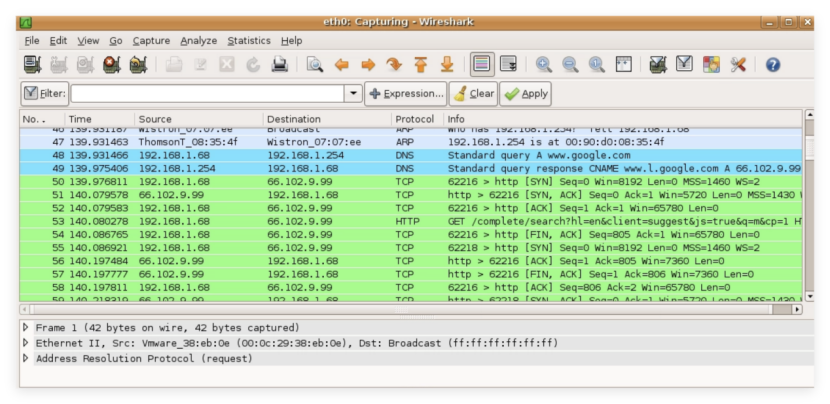
Wireshark
A network packet analysis software. The function of network packet analysis software is to intercept the network packet and display the most detailed network packet information as far as possible. Wireshark USES WinPCAP as an interface to exchange data messages directly with the network card. It is suitable for graphical grab, suitable for session, field, retransmission and abnormal flow.
Tcpdump
A command line network data acquisition and analysis tool, running in the Unix/Linux system, can be monitored by the method of capturing packets that flow through the network interface. Its core functions include filtering analysis based on network layer, protocol, host and port, supporting logical operator combination conditions and capturing results in readable format. Command line grab, suitable for servers and remote environments.
Fiddler
The HTTP protocol debugging proxy tool developed by Microsoft provides breakpoint debugging and request response content to view (including the Cookie、HTML、JS and so on), flow statistics, and caching strategy analysis capabilities. Like Charles tools, it is better suited for HTTP/HTTPS debugging and agent analysis.
Charles
An HTTP proxy/HTTP monitor/reverse agent, which can record and display all data sent and received when the browser or other Internet applications connect to the network through the Charles network. This allows developers to view all the HTTP and SSL/HTTPS flow between its machines and the Internet, including requests, responses, and HTTP headers containing cookies and cache information.
1. SSH tools
Common tools are:
Xshell
The security terminal simulation software developed by NetSarang is supported by SSH1, SSH2 and the TELNET protocol for Microsoft Windows platform, which can be used in the Windows interface to ask remote servers of different systems to achieve terminal control. The software supports port forwarding capabilities through the SSH tunnel mechanism, enabling the TCP/IP application to share secure connections and to provide a rich color scheme and TAB paging environment.
MobaXterm
A professional level remote connection and terminal enhancement software running on the Windows system. It integrates multiple network tools into single portable applications, including remote connections for multiple protocols such as SSH、RDP、VNC、X11, with the built-in x server to implement the local display of the Unix/Linux graphical interface, and to provide powerful tools for the tags terminal, session management, file transmission (SFTP/FTP), macro commands, and multiple execution.
PuTTY
The open source terminal simulation software, maintained by Simon Tatham, is authorized by the MIT license, initially focused on the development of the Windows platform, and then extends to the Unix platform and plans to be compatible with the MacOS system. The software supports the SSH, Telnet, rlogin, pure TCP and serial interface connection protocol, with volume light, complete free and complete free IPv6 connection support and the addition of the encryption algorithm compatibility feature.
OpenSSH
Free open source implementation of secure shell protocol. The SSH protocol group can be used for remote control or to transmit files between computers. In the traditional way of implementing this function, such as the Telnet (terminal simulation protocol), rcp ftp, rlogin, rsh is extremely unsave, and will use clear text to send the password. OpenSSH provides the server-side background and client tools to encrypt remote control and data in the transfer process.
2. When to use Industrial Switch Tools?
When the network has a message interaction and the business session class exception, it is a priority to carry out the bottom message resolution, the flow of the verification flow, the complete agreement interaction process, and the precise locking of the fault root cause; If you need to read the device's running metrics, check the configuration file, retrieve the system log, or issue the change instruction, you can complete the operation by the SSH terminal tool remote access device. The two kinds of tools can be coordinated to form the closed-loop barrier process: the method of capturing abnormal flow of the working device, and then the operation parameters and configuration of the equipment of the SSH login device, the recovery of the operation of the failure of the fault disposal, and the optimization of the repair effect, the network fault location and the disposal efficiency are greatly improved.
Industrial Switch Tools: Network monitoring and scanning tools
Port Mirroring (SPAN/RSPAN): Capture Traffic on Industrial Switches
About the author: Sara is a Customer Manager at Rayin with over 10 years of experience in the communications field. In her free time, she enjoys badminton and swimming.